Cozlings
Clicks pass through
Everywhere except on the pet itself, your clicks reach the window underneath. Ctrl+Alt+M hides them, Ctrl+Alt+N the notes.
Launching soon on the Microsoft Store
Pixel pets & sticky notes for your desktop
Little pixel pets, a brave knight kitten and handy sticky notes that live on top of every window. Pet them, play with them, jot things down. Clicks go straight through to whatever is underneath, so they never get in the way.
Windows 10 & 11 · free · no account · Mac coming later
They're live! Scroll down and press the buttons to see what each pet can do.
Company while you work, without the clutter
Everywhere except on the pet itself, your clicks reach the window underneath. Ctrl+Alt+M hides them, Ctrl+Alt+N the notes.
Rest your mouse on a pet and it purrs, snuggles or pants happily. Wiggle the mouse and it rolls over for a tickle. Poke too long and it sulks.
Fetch a stick, soak in a hot spring, tunnel across the screen, climb its edges, chase a butterfly. Double-click a pet for a surprise.
Notes that float on top, turn into checklists, shrink to one line or snap neatly to the edge of the screen.
Give a pet your own name on its little pixel name tag, and dress it in one of its skins: a Lop bunny, a Spa Day capybara, a Golden knight. Too big for your screen? Point at it, hold Ctrl and turn the mouse wheel.
A few megabytes. No account, works offline, and your notes stay on your PC.
Press a button and watch them do it. On your desktop they react to your mouse, too
A fluffy orange kitten with blue eyes. She plays with her fur ball, drinks her milk, naps, and chases a little rat that always, always gets away.
On your desktop Rest your mouse on her and she shuts her eyes and purrs. Wiggle it and she rolls over, ticklish. Double-click her and she washes her paws, or bats her fur ball over to you: carry it anywhere and she fetches it. Tap her for too long and she gets grumpy.
Turn sound on to hear her.
A happy chocolate Labrador. He fetches sticks, chews them up, does backflips and licks your screen when he wants attention.
On your desktop He pants happily when you rest your mouse on him and rolls over for a belly rub when you wiggle it. Poke him too long and you will hear about it.
Turn sound on to hear him.
Lies like a loaf, unbothered by everything. He soaks in a hot spring with an orange on his head, lets birds land on him and paddles in a pond.
On your desktop Rest your mouse on him for chin scratches; wiggle it and he flops over on his side. Poke him too much and he just turns his back.
Turn sound on to hear him.
Quick, curious and very expressive. He does happy twisting jumps, flops over when he is relaxed, nibbles carrots, digs a burrow and tunnels under the screen to pop up somewhere else.
On your desktop Rest your pointer near him and he hops over to sniff it. Poke him and he thumps his foot. When a carrot turns up on your screen, carry it anywhere: he hops after it, and eats it where you drop it.
Turn sound on to hear him.
Surprise him and he stands up on his back legs, arms wide, to look big. He munches bamboo, hugs his own tail and pounces on falling leaves.
On your desktop He climbs right up the edge of the screen and hangs from the top until his arms get tired.
Turn sound on to hear him.
Three tiny ducklings waddling in single file. They splash in puddles, peck at crumbs, chase a butterfly and take baths with a rubber duck.
On your desktop They snuggle when you rest your mouse on them and puff up into little balls when you wiggle it. Move it slowly near them and, now and then, they follow it in a line.
Turn sound on to hear them.
More than pets: companions with a job and their own little stories. A new one arrives about once a month
Kitten in plate armour · bug slayer · has a knight of her own
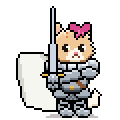
A tiny, very serious kitten with a pink bow and a sword taller than she is. Her job: slaying the bugs that crawl onto your desktop.
Her moves
With Knightpaw's Guardian twice her size, never far away
On your desktop She purrs when you rest your mouse on her and rolls over giggling when you wiggle it. Double-click her for a surprise, and poke her until she sulks to see who comes to guard her.
Turn sound on to hear the fanfare.
Two free friends, more to unlock, and new pets every few days
Free for everyone, no account needed.
Cozlings is launching soon on the Microsoft Store: free to start, with optional Basic and Premium.
Leave your email and we will tell you the day it launches. Nothing else.
The Mac version is on its way. Leave your email and we will tell you the day it is ready. Nothing else.
Yes. The app, the sticky notes, Miso and Enzo are free to keep, for good. Basic adds every pet; Premium adds every pet and the characters.
Yes, each one on its own, from 40% to 125%. Point at the pet, hold Ctrl and turn the mouse wheel (or pinch on a touchpad), or use the Size slider on its page in the Cozlings window.
Basic unlocks all the pets (new ones arrive every few days, as small downloads) and lets several of them out at once. Premium is everything in Basic plus the characters: bigger companions with their own stories, like Miss Knightpaw and Knightpaw's Guardian, with a new one about once a month. Each comes monthly, yearly or once for life. Upgrading from Basic to Premium never charges you twice.
Characters are more than pets: they have a job and little scenes. Miss Knightpaw slays the bugs that crawl onto your desktop, and a knight twice her size comes to her rescue, duels for her, comforts her when she trips chasing a butterfly, strikes a heroic stance beside her and even stands guard when you poke her too much.
Yes, on the paid pets and characters: right-click one to give it your own name (shown on its little name tag) or pick one of its skins. Name tags can be hidden too.
No. Clicks pass straight through everywhere except on the pet itself, and pets never take your keyboard. Ctrl+Alt+M hides them instantly, and you can tell a pet to stay in one spot.
Cozlings is a small app of a few megabytes. It uses the web engine already built into Windows instead of bringing its own browser, and the pets are tiny pixel animations.
No account, and everything works offline. Your notes and settings stay on your PC.
Inside the app, through the Microsoft Store. Microsoft handles the payment; we never see your card details. Prices are shown in the Store.
Cozlings is launching soon on the Microsoft Store, for Windows 10 and 11. Leave your email on this page and we will tell you the day it launches.
Not yet. Join the waitlist on this page and you will hear about it first.